JPK AFM Image Viewer & Loader (Python)
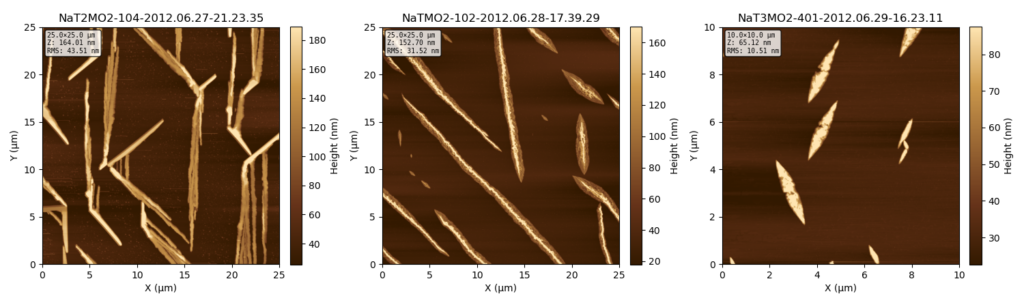
JPK AFM Viewer is a lightweight yet powerful Python utility designed to load, process, and visualize Atomic Force Microscopy (AFM) data acquired from JPK / Bruker NanoWizard 1 systems. It provides full access to all channels (Height, Phase, Error, etc.), automatically handles the complex JPK TIFF metadata for correct physical scaling, and offers robust image leveling routines.
The tool is ideal for researchers needing quick, reproducible visualization and comparison of AFM scans without relying on proprietary vendor software.
- Direct Data Access: Loads
.jpkfiles by correctly interpreting the custom JPK TIFF tags. - Automated Scaling: Ensures precise conversion of raw sensor data into physical units (nm, µm, V, °).
- Flexible Leveling: Supports standard leveling methods including Plane Fit, Line-by-Line Correction, and Robust Leveling (which minimizes the influence of particles/holes).
- Trace/Retrace Handling: Full support for visualizing and comparing Trace and Retrace passes for all channels.
- File Ordering & Comparison: Easily compare multiple files in a grid view. File selection supports:
Automatic Sorting: Alphabetical or by modification date.
Interactive Selection: Enables precise, manual ordering of files via a sequential selection dialog (using the-iflag).
Installation and Usage
Dependencies (Python 3.x)
The core functionality relies on standard scientific Python libraries and tifffile to handle the image format:
pip install numpy matplotlib scipy tifffile
Command Line Examples
# 1. Quick view of a single file (default: height channel, plane leveling)
python jpk_afm_viewer_v9.py scan_001.jpk

# 2. View all channels (Trace only) for a single scan
python jpk_afm_viewer_v9.py scan_001.jpk --all

# 3. Compare multiple scans with interactive (manual) file selection order
python jpk_afm_viewer_v9.py -i --channel height --leveling line_robust
Download
#!/usr/bin/env python3
"""
JPK AFM Image Loader & Viewer
=============================
Loads JPK TIFF-based AFM images with all channels,
correct scaling and leveling.
Tested with JPK NanoWizard files.
Dependencies:
conda install -c conda-forge numpy matplotlib scipy tifffile
Author: Claude and Frank Balzer (ORCID: 0000-0002-6228-6839)
"""
import numpy as np
import matplotlib.pyplot as plt
from matplotlib.colors import LinearSegmentedColormap
from pathlib import Path
from dataclasses import dataclass
from typing import Optional
import warnings
import sys
try:
import tifffile
except ImportError:
raise ImportError(
"tifffile is required.\n"
"Installation: conda install -c conda-forge tifffile"
)
# =============================================================================
# DATA STRUCTURES
# =============================================================================
@dataclass
class JPKChannel:
"""Represents a single AFM data channel."""
name: str
data: np.ndarray
unit: str
is_retrace: bool = False
multiplier: float = 1.0
offset: float = 0.0
@property
def display_name(self) -> str:
"""Name with trace/retrace indicator."""
suffix = " (retrace)" if self.is_retrace else " (trace)"
return self.name + suffix
@dataclass
class JPKImage:
"""Represents a complete JPK AFM image."""
filename: str
width_m: float
height_m: float
pixels_x: int
pixels_y: int
channels: dict
properties: dict
@property
def pixel_size_x(self) -> float:
return self.width_m / self.pixels_x
@property
def pixel_size_y(self) -> float:
return self.height_m / self.pixels_y
def get_channel(self, name: str, retrace: bool = False) -> Optional[JPKChannel]:
"""Gets a channel by name and trace/retrace."""
for ch in self.channels.values():
if name.lower() in ch.name.lower() and ch.is_retrace == retrace:
return ch
# Fallback: search by name only
for ch in self.channels.values():
if name.lower() in ch.name.lower():
return ch
return None
# =============================================================================
# JPK TIFF TAGS (Custom Tags by JPK Instruments)
# =============================================================================
class JPKTiffTags:
"""JPK-specific TIFF tag IDs."""
CHANNEL_NAME_SHORT = 32848
CHANNEL_INDEX = 32849
CHANNEL_NAME_FULL = 32850
CHANNEL_PROPERTIES = 32851
# Scan size (in page 0 / thumbnail)
SCAN_WIDTH = 32834
SCAN_HEIGHT = 32835
PIXELS_X = 32838
PIXELS_Y = 32839
# Calibrated height scaling (what we want)
CALIB_NAME = 33072
CALIB_DTYPE = 33073
CALIB_UNIT = 33074
CALIB_TYPE = 33075
CALIB_MULTIPLIER = 33076
CALIB_OFFSET = 33077
# Alternative scalings
NOMINAL_MULTIPLIER = 33028
NOMINAL_OFFSET = 33029
VOLTS_MULTIPLIER = 32980
VOLTS_OFFSET = 32981
# =============================================================================
# JPK TIFF LOADER
# =============================================================================
class JPKTiffLoader:
"""Loader for JPK TIFF format AFM files."""
def __init__(self, filepath: str | Path):
self.filepath = Path(filepath)
self.properties = {}
self.channels = {}
def load(self) -> JPKImage:
"""Loads the JPK TIFF file."""
if not self.filepath.exists():
raise FileNotFoundError(f"File not found: {self.filepath}")
with tifffile.TiffFile(self.filepath) as tif:
# Extract scan size from first data image
scan_width, scan_height = self._extract_scan_size(tif)
pixels_x = 0
pixels_y = 0
# Iterate through all pages
for i, page in enumerate(tif.pages):
# Skip thumbnail (typically 64x64 or smallest page)
if page.shape[0] < 128 or page.shape[1] < 128:
continue
# Remember image size
if pixels_x == 0:
pixels_y, pixels_x = page.shape
# Extract channel information
channel = self._extract_channel(page, i)
if channel is not None:
# Create unique key
key = f"{channel.name}_{'retrace' if channel.is_retrace else 'trace'}"
self.channels[key] = channel
# Fallback for scan size if not found
if scan_width == 0:
scan_width = pixels_x * 1e-8 # 10 nm/pixel as default
if scan_height == 0:
scan_height = pixels_y * 1e-8
return JPKImage(
filename=self.filepath.name,
width_m=scan_width,
height_m=scan_height,
pixels_x=pixels_x,
pixels_y=pixels_y,
channels=self.channels,
properties=self.properties
)
def _extract_scan_size(self, tif: tifffile.TiffFile) -> tuple[float, float]:
"""Extracts scan size from TIFF metadata (page 0)."""
scan_width = 0.0
scan_height = 0.0
# Scan size is stored in page 0 (thumbnail)
if len(tif.pages) > 0:
page0 = tif.pages[0]
tags = page0.tags
# JPK stores scan size in custom tags
if JPKTiffTags.SCAN_WIDTH in tags:
scan_width = float(tags[JPKTiffTags.SCAN_WIDTH].value)
if JPKTiffTags.SCAN_HEIGHT in tags:
scan_height = float(tags[JPKTiffTags.SCAN_HEIGHT].value)
return scan_width, scan_height
def _extract_channel(self, page: tifffile.TiffPage, page_index: int) -> Optional[JPKChannel]:
"""Extracts channel data and metadata from a TIFF page."""
tags = page.tags
# Extract channel name
channel_name = f"channel_{page_index}"
if JPKTiffTags.CHANNEL_NAME_SHORT in tags:
channel_name = str(tags[JPKTiffTags.CHANNEL_NAME_SHORT].value)
elif JPKTiffTags.CHANNEL_NAME_FULL in tags:
channel_name = str(tags[JPKTiffTags.CHANNEL_NAME_FULL].value)
# Trace/Retrace from properties
is_retrace = False
if JPKTiffTags.CHANNEL_PROPERTIES in tags:
props = str(tags[JPKTiffTags.CHANNEL_PROPERTIES].value)
is_retrace = 'retrace : true' in props.lower() or 'retrace: true' in props.lower()
# Extract scaling factors
multiplier = 1.0
offset = 0.0
unit = 'a.u.'
# Preferred: Calibrated scaling
if JPKTiffTags.CALIB_MULTIPLIER in tags:
multiplier = float(tags[JPKTiffTags.CALIB_MULTIPLIER].value)
elif JPKTiffTags.NOMINAL_MULTIPLIER in tags:
multiplier = float(tags[JPKTiffTags.NOMINAL_MULTIPLIER].value)
if JPKTiffTags.CALIB_OFFSET in tags:
offset = float(tags[JPKTiffTags.CALIB_OFFSET].value)
elif JPKTiffTags.NOMINAL_OFFSET in tags:
offset = float(tags[JPKTiffTags.NOMINAL_OFFSET].value)
if JPKTiffTags.CALIB_UNIT in tags:
unit = str(tags[JPKTiffTags.CALIB_UNIT].value)
# Load raw data and calibrate
try:
raw_data = page.asarray().astype(np.float64)
calibrated_data = raw_data * multiplier + offset
except Exception as e:
warnings.warn(f"Error loading page {page_index}: {e}")
return None
return JPKChannel(
name=channel_name,
data=calibrated_data,
unit=unit,
is_retrace=is_retrace,
multiplier=multiplier,
offset=offset
)
# =============================================================================
# LEVELING FUNCTIONS
# =============================================================================
def level_plane_fit(data: np.ndarray) -> np.ndarray:
"""Plane-fit leveling (removes global tilt)."""
ny, nx = data.shape
x = np.arange(nx)
y = np.arange(ny)
X, Y = np.meshgrid(x, y)
A = np.column_stack([X.ravel(), Y.ravel(), np.ones(nx * ny)])
z = data.ravel()
# Exclude NaN values
mask = np.isfinite(z)
if not mask.all():
coeffs, _, _, _ = np.linalg.lstsq(A[mask], z[mask], rcond=None)
else:
coeffs, _, _, _ = np.linalg.lstsq(A, z, rcond=None)
plane = coeffs[0] * X + coeffs[1] * Y + coeffs[2]
return data - plane
def level_line_by_line(data: np.ndarray, order: int = 1) -> np.ndarray:
"""Line-by-line leveling."""
ny, nx = data.shape
leveled = np.zeros_like(data)
x = np.arange(nx)
for i in range(ny):
line = data[i, :]
mask = np.isfinite(line)
if mask.sum() > order + 1:
coeffs = np.polyfit(x[mask], line[mask], order)
baseline = np.polyval(coeffs, x)
leveled[i, :] = line - baseline
else:
leveled[i, :] = line
return leveled
def level_median_diff(data: np.ndarray) -> np.ndarray:
"""Median-difference leveling for scan artifacts."""
leveled = data.copy()
for i in range(1, data.shape[0]):
diff = np.nanmedian(data[i, :]) - np.nanmedian(data[i-1, :])
leveled[i, :] -= diff
leveled -= np.nanmedian(leveled)
return leveled
def level_robust(data: np.ndarray, percentile_low: float = 10, percentile_high: float = 90) -> np.ndarray:
"""
Robust leveling in two steps:
1. Global plane-fit (removes tilt)
2. Robust line-by-line leveling (ignores holes/particles)
Args:
data: 2D height data
percentile_low: Lower percentile for robust fit (default: 10%)
percentile_high: Upper percentile for robust fit (default: 90%)
Returns:
Leveled array
"""
ny, nx = data.shape
x = np.arange(nx)
# Step 1: Global plane-fit
step1 = level_plane_fit(data)
# Step 2: Robust line-by-line leveling
# Percentile bounds from already leveled data
p_low = np.nanpercentile(step1, percentile_low)
p_high = np.nanpercentile(step1, percentile_high)
step2 = np.zeros_like(step1)
for i in range(ny):
line = step1[i, :]
# Mask: only "normal" values (no holes/particles)
mask = (line >= p_low) & (line <= p_high) & np.isfinite(line)
if mask.sum() > 2:
coeffs = np.polyfit(x[mask], line[mask], 1)
baseline = np.polyval(coeffs, x)
step2[i, :] = line - baseline
else:
step2[i, :] = line
return step2
def level_line_robust(data: np.ndarray, order: int = 1,
percentile_low: float = 10, percentile_high: float = 90) -> np.ndarray:
"""
Robust line-by-line leveling in two steps:
1. Normal line-by-line leveling
2. Robust line-by-line leveling (ignores holes/particles)
Args:
data: 2D height data
order: Polynomial order for fit (default: 1 = linear)
percentile_low: Lower percentile for robust fit (default: 10%)
percentile_high: Upper percentile for robust fit (default: 90%)
Returns:
Leveled array
"""
ny, nx = data.shape
x = np.arange(nx)
# Step 1: Normal line-by-line leveling
step1 = np.zeros_like(data)
for i in range(ny):
line = data[i, :]
mask = np.isfinite(line)
if mask.sum() > order + 1:
coeffs = np.polyfit(x[mask], line[mask], order)
baseline = np.polyval(coeffs, x)
step1[i, :] = line - baseline
else:
step1[i, :] = line
# Step 2: Robust line-by-line leveling
# Percentile bounds from already leveled data
p_low = np.nanpercentile(step1, percentile_low)
p_high = np.nanpercentile(step1, percentile_high)
step2 = np.zeros_like(step1)
for i in range(ny):
line = step1[i, :]
# Mask: only "normal" values (no holes/particles)
mask = (line >= p_low) & (line <= p_high) & np.isfinite(line)
if mask.sum() > order + 1:
coeffs = np.polyfit(x[mask], line[mask], order)
baseline = np.polyval(coeffs, x)
step2[i, :] = line - baseline
else:
step2[i, :] = line
return step2
def apply_leveling(data: np.ndarray, method: str = 'plane',
percentile_low: float = 10, percentile_high: float = 90) -> np.ndarray:
"""
Applies leveling.
Args:
data: 2D height data
method: Leveling method
percentile_low: Lower percentile for robust methods (default: 10%)
percentile_high: Upper percentile for robust methods (default: 90%)
"""
if method == 'plane':
return level_plane_fit(data)
elif method == 'line':
return level_line_by_line(data)
elif method == 'median':
return level_median_diff(data)
elif method == 'robust':
return level_robust(data, percentile_low, percentile_high)
elif method == 'line_robust':
return level_line_robust(data, percentile_low=percentile_low,
percentile_high=percentile_high)
else:
raise ValueError(f"Method '{method}' unknown. Available: plane, line, median, robust, line_robust")
# =============================================================================
# VISUALIZATION
# =============================================================================
def create_afm_colormap():
"""AFM-typische Farbskala (braun-gold)."""
colors = [
(0.2, 0.1, 0.0),
(0.4, 0.2, 0.1),
(0.6, 0.4, 0.2),
(0.8, 0.6, 0.3),
(1.0, 0.9, 0.7),
]
return LinearSegmentedColormap.from_list('afm_brown', colors)
def format_scale(value_m: float) -> tuple[float, str]:
"""Converts meters to appropriate unit."""
if abs(value_m) >= 1e-3:
return value_m * 1e3, 'mm'
elif abs(value_m) >= 1e-6:
return value_m * 1e6, 'µm'
elif abs(value_m) >= 1e-9:
return value_m * 1e9, 'nm'
else:
return value_m * 1e12, 'pm'
def plot_afm_image(image: JPKImage,
channel_name: str = 'height',
retrace: bool = False,
leveling: str = 'plane',
colormap: str = 'afm',
figsize: tuple = (10, 8),
show_histogram: bool = False,
enhance_contrast: bool = True,
percentile_low: float = 10,
percentile_high: float = 90) -> plt.Figure:
"""
Displays an AFM image.
Args:
image: JPKImage object
channel_name: Channel name (e.g. 'height', 'error', 'adhesion')
retrace: True for retrace, False for trace
leveling: 'plane', 'line', 'median', 'robust', 'line_robust' or None
colormap: 'afm', 'viridis', etc.
figsize: Figure size
percentile_low: Lower percentile for robust leveling
percentile_high: Upper percentile for robust leveling
"""
# Find channel
channel = image.get_channel(channel_name, retrace)
if channel is None:
available = [f"{ch.name} ({'retrace' if ch.is_retrace else 'trace'})"
for ch in image.channels.values()]
raise ValueError(f"Channel '{channel_name}' not found.\nAvailable: {available}")
# Data and leveling
data = channel.data.copy()
if leveling and channel.unit == 'm':
data = apply_leveling(data, method=leveling,
percentile_low=percentile_low,
percentile_high=percentile_high)
# Units for XY axes
width_scaled, x_unit = format_scale(image.width_m)
height_scaled, y_unit = format_scale(image.height_m)
# Z unit depending on channel
if channel.unit == 'm':
z_range = np.nanmax(data) - np.nanmin(data)
_, z_unit = format_scale(z_range)
scale_factors = {'mm': 1e3, 'µm': 1e6, 'nm': 1e9, 'pm': 1e12}
z_scale = scale_factors.get(z_unit, 1)
data_display = data * z_scale
# Set minimum to 0
data_display = data_display - np.nanmin(data_display)
# Stretch contrast (optional)
if enhance_contrast:
p_low = np.nanpercentile(data_display, 2)
p_high = np.nanpercentile(data_display, 98)
data_display = np.clip(data_display, p_low, p_high)
colorbar_label = f'Height ({z_unit})'
use_cmap = create_afm_colormap() if colormap == 'afm' else colormap
elif channel.unit == 'V':
data_display = data * 1e3 # mV
z_unit = 'mV'
colorbar_label = f'{channel.name} ({z_unit})'
use_cmap = create_afm_colormap() if colormap == 'afm' else colormap
elif channel.unit == '°' or 'phase' in channel.name.lower():
data_display = data
# Stretch contrast (optional)
if enhance_contrast:
p_low = np.nanpercentile(data_display, 2)
p_high = np.nanpercentile(data_display, 98)
data_display = np.clip(data_display, p_low, p_high)
z_unit = '°'
colorbar_label = 'Phase (°)'
use_cmap = 'gray'
else:
data_display = data
z_unit = channel.unit if channel.unit else 'a.u.'
colorbar_label = f'{channel.name} ({z_unit})'
use_cmap = create_afm_colormap() if colormap == 'afm' else colormap
# Plot erstellen
if show_histogram:
fig, (ax, ax_hist) = plt.subplots(2, 1, figsize=(figsize[0], figsize[1] + 2),
gridspec_kw={'height_ratios': [4, 1]})
else:
fig, ax = plt.subplots(figsize=figsize)
extent = [0, width_scaled, 0, height_scaled]
im = ax.imshow(data_display, origin='lower', extent=extent,
cmap=use_cmap, aspect='equal')
ax.set_xlabel(f'X ({x_unit})')
ax.set_ylabel(f'Y ({y_unit})')
trace_str = "Retrace" if channel.is_retrace else "Trace"
level_str = f", Leveling: {leveling}" if leveling else ""
ax.set_title(f"{image.filename}\n{channel.name} ({trace_str}){level_str}")
cbar = fig.colorbar(im, ax=ax, fraction=0.046, pad=0.04)
cbar.set_label(colorbar_label)
# Statistics
stats = (
f"Size: {width_scaled:.2f} × {height_scaled:.2f} {x_unit}\n"
f"Pixel: {image.pixels_x} × {image.pixels_y}\n"
f"Z-Range: {np.nanmax(data_display) - np.nanmin(data_display):.2f} {z_unit}\n"
f"RMS: {np.nanstd(data_display):.2f} {z_unit}"
)
ax.text(0.02, 0.98, stats, transform=ax.transAxes,
verticalalignment='top', fontsize=9, family='monospace',
bbox=dict(boxstyle='round', facecolor='white', alpha=0.8))
# Histogram
if show_histogram:
hist_data = data_display.flatten()
hist_data = hist_data[np.isfinite(hist_data)]
ax_hist.hist(hist_data, bins=100, color='steelblue', edgecolor='none', alpha=0.7)
ax_hist.set_xlabel(colorbar_label)
ax_hist.set_ylabel('Count')
ax_hist.set_title('Height Distribution')
ax_hist.axvline(np.mean(hist_data), color='red', linestyle='--',
label=f'Mean: {np.mean(hist_data):.2f}')
ax_hist.axvline(np.median(hist_data), color='orange', linestyle='-',
label=f'Median: {np.median(hist_data):.2f}')
ax_hist.legend(fontsize=8)
plt.tight_layout()
enable_clipboard_shortcut(fig)
return fig
def plot_all_channels(image: JPKImage,
leveling: str = 'plane',
trace_only: bool = True,
figsize: tuple = (16, 12),
enhance_contrast: bool = True,
percentile_low: float = 10,
percentile_high: float = 90) -> plt.Figure:
"""Displays all channels in a grid."""
# Filter channels
if trace_only:
channels = [ch for ch in image.channels.values() if not ch.is_retrace]
else:
channels = list(image.channels.values())
n_channels = len(channels)
if n_channels == 0:
raise ValueError("No channels found")
# Calculate grid layout
n_cols = min(3, n_channels)
n_rows = (n_channels + n_cols - 1) // n_cols
fig, axes = plt.subplots(n_rows, n_cols, figsize=figsize)
if n_channels == 1:
axes = np.array([axes])
axes = axes.flatten()
# Extent for all images
width_scaled, x_unit = format_scale(image.width_m)
height_scaled, y_unit = format_scale(image.height_m)
extent = [0, width_scaled, 0, height_scaled]
cmap = create_afm_colormap()
for i, channel in enumerate(channels):
ax = axes[i]
data = channel.data.copy()
if leveling and channel.unit == 'm':
data = apply_leveling(data, method=leveling,
percentile_low=percentile_low,
percentile_high=percentile_high)
# Scaling depending on channel
if channel.unit == 'm':
z_range = np.nanmax(data) - np.nanmin(data)
_, z_unit = format_scale(z_range)
scale_factors = {'mm': 1e3, 'µm': 1e6, 'nm': 1e9, 'pm': 1e12}
z_scale = scale_factors.get(z_unit, 1)
data_display = data * z_scale
# Set minimum to 0
data_display = data_display - np.nanmin(data_display)
# Stretch contrast (optional)
if enhance_contrast:
p_low = np.nanpercentile(data_display, 2)
p_high = np.nanpercentile(data_display, 98)
data_display = np.clip(data_display, p_low, p_high)
colorbar_label = f'Height ({z_unit})'
use_cmap = cmap
elif channel.unit == 'V':
data_display = data * 1e3
z_unit = 'mV'
colorbar_label = f'{channel.name} ({z_unit})'
use_cmap = cmap
elif channel.unit == '°' or 'phase' in channel.name.lower():
data_display = data
# Stretch contrast (optional)
if enhance_contrast:
p_low = np.nanpercentile(data_display, 2)
p_high = np.nanpercentile(data_display, 98)
data_display = np.clip(data_display, p_low, p_high)
z_unit = '°'
colorbar_label = 'Phase (°)'
use_cmap = 'gray'
else:
data_display = data
z_unit = channel.unit if channel.unit else 'a.u.'
colorbar_label = f'{channel.name} ({z_unit})'
use_cmap = cmap
im = ax.imshow(data_display, origin='lower', extent=extent,
cmap=use_cmap, aspect='equal')
ax.set_xlabel(f'X ({x_unit})')
ax.set_ylabel(f'Y ({y_unit})')
trace_str = "R" if channel.is_retrace else "T"
ax.set_title(f"{channel.name} ({trace_str})\nZ: {np.nanmax(data_display) - np.nanmin(data_display):.2f} {z_unit}")
cbar = fig.colorbar(im, ax=ax, fraction=0.046, pad=0.04)
cbar.set_label(colorbar_label)
# Hide empty subplots
for i in range(n_channels, len(axes)):
axes[i].set_visible(False)
fig.suptitle(f"{image.filename}", fontsize=14, fontweight='bold')
plt.tight_layout()
enable_clipboard_shortcut(fig)
return fig
# =============================================================================
# MULTI-FILE FUNCTIONS
# =============================================================================
def copy_figure_to_clipboard(fig=None):
"""
Copies the current figure to clipboard (Windows).
Args:
fig: matplotlib Figure (if None, current figure is used)
"""
import io
if fig is None:
fig = plt.gcf()
# Save figure as PNG to buffer
buf = io.BytesIO()
fig.savefig(buf, format='png', dpi=150, bbox_inches='tight',
facecolor='white', edgecolor='none')
buf.seek(0)
try:
# Windows: PIL + win32clipboard
from PIL import Image
import win32clipboard
# Convert PNG to BMP (Windows clipboard requires BMP)
img = Image.open(buf)
output = io.BytesIO()
img.convert('RGB').save(output, 'BMP')
data = output.getvalue()[14:] # Remove BMP header
output.close()
win32clipboard.OpenClipboard()
win32clipboard.EmptyClipboard()
win32clipboard.SetClipboardData(win32clipboard.CF_DIB, data)
win32clipboard.CloseClipboard()
print("✓ Figure copied to clipboard!")
except ImportError:
# Fallback: Save as file
temp_path = Path.home() / "afm_clipboard_temp.png"
buf.seek(0)
with open(temp_path, 'wb') as f:
f.write(buf.read())
print(f"win32clipboard not installed.")
print(f"Installation: conda install pywin32")
print(f"Image saved as: {temp_path}")
buf.close()
def enable_clipboard_shortcut(fig=None):
"""
Enables Ctrl+C to copy the figure.
Args:
fig: matplotlib Figure
"""
if fig is None:
fig = plt.gcf()
def on_key(event):
if event.key == 'ctrl+c':
copy_figure_to_clipboard(fig)
fig.canvas.mpl_connect('key_press_event', on_key)
print("Tip: Ctrl+C copies the image to clipboard")
def plot_multiple_files(filepaths: list,
channel_name: str = 'height',
retrace: bool = False,
leveling: str = 'plane',
colormap: str = 'afm',
figsize: tuple = None,
titles: list = None,
show_histogram: bool = False,
enhance_contrast: bool = True,
percentile_low: float = 10,
percentile_high: float = 90) -> plt.Figure:
"""
Displays multiple JPK files side by side.
Args:
filepaths: List of file paths
channel_name: Channel name
retrace: True for retrace
leveling: Leveling method
colormap: Color scale
figsize: Figure size (automatic if None)
titles: Optional titles for each image
show_histogram: Show histogram below each image
enhance_contrast: Contrast enhancement (2-98 percentile)
Returns:
matplotlib Figure
"""
n_files = len(filepaths)
if n_files == 0:
raise ValueError("No files specified")
# Calculate grid layout
if n_files <= 3:
n_cols = n_files
n_rows = 1
elif n_files <= 6:
n_cols = 3
n_rows = 2
elif n_files <= 9:
n_cols = 3
n_rows = 3
else:
n_cols = 4
n_rows = (n_files + 3) // 4
# Figure size
if figsize is None:
if show_histogram:
figsize = (5 * n_cols, 6 * n_rows) # More space for histograms
else:
figsize = (5 * n_cols, 4.5 * n_rows)
# With histogram: Double rows (image + histogram)
if show_histogram:
fig, axes = plt.subplots(n_rows * 2, n_cols, figsize=figsize, squeeze=False,
gridspec_kw={'height_ratios': [3, 1] * n_rows})
img_axes = axes[0::2].flatten() # Every second row (images)
hist_axes = axes[1::2].flatten() # Every second row (histograms)
else:
fig, axes = plt.subplots(n_rows, n_cols, figsize=figsize, squeeze=False)
img_axes = axes.flatten()
hist_axes = [None] * len(img_axes)
cmap = create_afm_colormap() if colormap == 'afm' else colormap
# Load all images
images = []
for fp in filepaths:
try:
img = load_jpk_image(fp)
images.append(img)
except Exception as e:
print(f"Error loading {fp}: {e}")
images.append(None)
for i, (ax, ax_hist, image) in enumerate(zip(img_axes, hist_axes, images)):
if image is None:
ax.set_visible(False)
if ax_hist is not None:
ax_hist.set_visible(False)
continue
# Get channel
channel = image.get_channel(channel_name, retrace)
if channel is None:
ax.text(0.5, 0.5, f"Channel '{channel_name}'\nnot found",
ha='center', va='center', transform=ax.transAxes)
ax.set_title(image.filename)
continue
# Data and leveling
data = channel.data.copy()
if leveling and channel.unit == 'm':
data = apply_leveling(data, method=leveling,
percentile_low=percentile_low,
percentile_high=percentile_high)
# Units
width_scaled, x_unit = format_scale(image.width_m)
height_scaled, y_unit = format_scale(image.height_m)
# Z unit depending on channel
if channel.unit == 'm':
z_range = np.nanmax(data) - np.nanmin(data)
_, z_unit = format_scale(z_range)
scale_factors = {'mm': 1e3, 'µm': 1e6, 'nm': 1e9, 'pm': 1e12}
z_scale = scale_factors.get(z_unit, 1)
data_display = data * z_scale
# Set minimum to 0
data_display = data_display - np.nanmin(data_display)
# Stretch contrast (optional)
if enhance_contrast:
p_low = np.nanpercentile(data_display, 2)
p_high = np.nanpercentile(data_display, 98)
data_display = np.clip(data_display, p_low, p_high)
colorbar_label = f'Height ({z_unit})'
use_cmap = cmap
elif channel.unit == 'V':
data_display = data * 1e3
z_unit = 'mV'
colorbar_label = f'{channel.name} ({z_unit})'
use_cmap = cmap
elif channel.unit == '°' or 'phase' in channel.name.lower():
data_display = data
# Stretch contrast (optional)
if enhance_contrast:
p_low = np.nanpercentile(data_display, 2)
p_high = np.nanpercentile(data_display, 98)
data_display = np.clip(data_display, p_low, p_high)
z_unit = '°'
colorbar_label = 'Phase (°)'
use_cmap = 'gray'
else:
data_display = data
z_unit = channel.unit if channel.unit else 'a.u.'
colorbar_label = f'{channel.name} ({z_unit})'
use_cmap = cmap
extent = [0, width_scaled, 0, height_scaled]
im = ax.imshow(data_display, origin='lower', extent=extent,
cmap=use_cmap, aspect='equal')
ax.set_xlabel(f'X ({x_unit})')
ax.set_ylabel(f'Y ({y_unit})')
# Title
if titles and i < len(titles):
title = titles[i]
else:
title = Path(filepaths[i]).stem # Filename without extension
z_range_display = np.nanmax(data_display) - np.nanmin(data_display)
ax.set_title(f"{title}")
# Statistics box
stats = (
f"{width_scaled:.1f}×{height_scaled:.1f} {x_unit}\n"
f"Z: {z_range_display:.2f} {z_unit}\n"
f"RMS: {np.nanstd(data_display):.2f} {z_unit}"
)
ax.text(0.02, 0.98, stats, transform=ax.transAxes,
verticalalignment='top', fontsize=7, family='monospace',
bbox=dict(boxstyle='round', facecolor='white', alpha=0.8))
cbar = fig.colorbar(im, ax=ax, fraction=0.046, pad=0.04)
cbar.set_label(colorbar_label)
# Histogram
if ax_hist is not None:
hist_data = data_display.flatten()
hist_data = hist_data[np.isfinite(hist_data)]
ax_hist.hist(hist_data, bins=50, color='steelblue', edgecolor='none', alpha=0.7)
ax_hist.set_xlabel(colorbar_label, fontsize=8)
ax_hist.set_ylabel('Count', fontsize=8)
ax_hist.tick_params(labelsize=7)
# Hide empty subplots
for i in range(n_files, len(img_axes)):
img_axes[i].set_visible(False)
if show_histogram:
hist_axes[i].set_visible(False)
plt.tight_layout()
enable_clipboard_shortcut(fig)
return fig
def select_files_dialog(sort_by: str = 'name') -> list:
"""
Opens a file selection dialog for multiple JPK files.
Args:
sort_by: Sorting - 'name' (alphabetical), 'date' (modification date),
'none' (as returned by dialog)
Returns:
List of selected file paths
"""
try:
import tkinter as tk
from tkinter import filedialog
except ImportError:
raise ImportError("tkinter is required for the file dialog")
root = tk.Tk()
root.withdraw() # Hide main window
root.attributes('-topmost', True) # Bring dialog to foreground
filepaths = filedialog.askopenfilenames(
title="Select JPK files",
filetypes=[
("JPK Files", "*.jpk *.jpk-qi-image *.jpk-force-map"),
("All Files", "*.*")
]
)
root.destroy()
filepaths = list(filepaths)
# Apply sorting
if sort_by == 'name':
filepaths.sort(key=lambda x: Path(x).name.lower())
elif sort_by == 'date':
filepaths.sort(key=lambda x: Path(x).stat().st_mtime)
# 'none' = no sorting
return filepaths
def select_files_interactive() -> list:
"""
Interactive file selection with order control.
Opens the dialog multiple times and adds files in the desired order.
Returns:
List of file paths in selection order
"""
try:
import tkinter as tk
from tkinter import filedialog, messagebox
except ImportError:
raise ImportError("tkinter is required for the file dialog")
filepaths = []
root = tk.Tk()
root.withdraw()
print("Interactive file selection:")
print(" - Select files individually or in groups")
print(" - Click 'Cancel' when done")
print()
while True:
root.attributes('-topmost', True)
selected = filedialog.askopenfilenames(
title=f"Select file(s) (so far: {len(filepaths)}) - Cancel when done",
filetypes=[
("JPK Files", "*.jpk *.jpk-qi-image *.jpk-force-map"),
("All Files", "*.*")
]
)
if not selected:
break
for fp in selected:
if fp not in filepaths:
filepaths.append(fp)
print(f" {len(filepaths)}. {Path(fp).name}")
root.destroy()
print(f"\n{len(filepaths)} file(s) selected")
return filepaths
def quick_compare(filepaths: list = None,
channel: str = 'height',
leveling: str = 'plane',
sort_by: str = 'name',
interactive: bool = False) -> plt.Figure:
"""
Quick comparison of multiple files.
Args:
filepaths: List of paths (opens dialog if None)
channel: Channel name
leveling: Leveling method
sort_by: Sorting - 'name', 'date', 'none'
interactive: If True, opens dialog multiple times for exact order
Example:
# With file dialog (alphabetically sorted)
quick_compare()
# With interactive order
quick_compare(interactive=True)
# Sorted by date
quick_compare(sort_by='date')
# With explicit list (custom order)
quick_compare([r"C:/Data/scan1.jpk", r"C:/Data/scan2.jpk"])
"""
if filepaths is None:
if interactive:
filepaths = select_files_interactive()
else:
filepaths = select_files_dialog(sort_by=sort_by)
if not filepaths:
print("No files selected")
return None
print(f"Loading {len(filepaths)} file(s)...")
for i, fp in enumerate(filepaths, 1):
print(f" {i}. {Path(fp).name}")
fig = plot_multiple_files(filepaths, channel_name=channel, leveling=leveling)
plt.show()
return fig
# =============================================================================
# MAIN FUNCTIONS
# =============================================================================
def load_jpk_image(filepath: str | Path) -> JPKImage:
"""
Loads a JPK AFM image file.
Args:
filepath: Path to .jpk file
Returns:
JPKImage object with all channels
"""
loader = JPKTiffLoader(filepath)
return loader.load()
def list_channels(image: JPKImage) -> list[str]:
"""Lists all channels."""
result = []
for key, ch in image.channels.items():
trace_str = "retrace" if ch.is_retrace else "trace"
result.append(f"{ch.name} ({trace_str}) - Unit: {ch.unit}")
return result
def get_height_data(image: JPKImage,
retrace: bool = False,
leveling: str = 'plane') -> np.ndarray:
"""Extracts height data."""
channel = image.get_channel('height', retrace)
if channel is None:
raise ValueError("Height channel not found")
data = channel.data.copy()
if leveling:
data = apply_leveling(data, method=leveling)
return data
# =============================================================================
# INTERACTIVE USAGE
# =============================================================================
def quick_view(filepath: str | Path, channel: str = 'height', leveling: str = 'plane'):
"""
Quick display of a JPK file.
Example:
quick_view(r"C:/Data/scan.jpk")
quick_view(r"C:/Data/scan.jpk", channel='error')
"""
image = load_jpk_image(filepath)
print(f"File: {image.filename}")
print(f"Size: {image.pixels_x} × {image.pixels_y} Pixel")
print(f"Scan: {image.width_m*1e6:.2f} × {image.height_m*1e6:.2f} µm")
print(f"\nChannels:")
for ch_info in list_channels(image):
print(f" - {ch_info}")
fig = plot_afm_image(image, channel_name=channel, leveling=leveling)
plt.show()
return image
# =============================================================================
# COMMAND LINE
# =============================================================================
if __name__ == "__main__":
import argparse
parser = argparse.ArgumentParser(description='JPK AFM Viewer')
parser.add_argument('files', nargs='*', help='JPK file(s)')
parser.add_argument('-c', '--channel', default='height', help='Channel')
parser.add_argument('-l', '--leveling', default='plane',
choices=['plane', 'line', 'median', 'robust', 'line_robust', 'none'])
parser.add_argument('--plow', type=float, default=10,
help='Lower percentile for robust leveling (default: 10)')
parser.add_argument('--phigh', type=float, default=90,
help='Upper percentile for robust leveling (default: 90)')
parser.add_argument('-r', '--retrace', action='store_true', help='Show retrace')
parser.add_argument('--all', action='store_true', help='Show all channels')
parser.add_argument('--list', action='store_true', help='List channels')
parser.add_argument('--histogram', action='store_true', help='Show histogram')
parser.add_argument('--no-enhance', action='store_true', help='Disable contrast enhancement')
parser.add_argument('-o', '--output', help='Output file')
parser.add_argument('--select', action='store_true', help='Open file selection dialog')
parser.add_argument('--interactive', '-i', action='store_true',
help='Interactive file selection (for exact order)')
parser.add_argument('--sort', choices=['name', 'date', 'none'], default='name',
help='Sorting: name (alphabetical), date (modification date), none')
args = parser.parse_args()
# File selection dialog
if args.select or args.interactive or not args.files:
if args.select or args.interactive or len(sys.argv) == 1:
if args.interactive:
filepaths = select_files_interactive()
else:
filepaths = select_files_dialog(sort_by=args.sort)
if not filepaths:
print("No files selected")
sys.exit(0)
else:
parser.print_help()
print("\n\nExamples:")
print(" python jpk_afm_viewer_v2.py scan.jpk")
print(" python jpk_afm_viewer_v2.py scan1.jpk scan2.jpk scan3.jpk")
print(" python jpk_afm_viewer_v2.py --select")
print(" python jpk_afm_viewer_v2.py --select --sort date")
print(" python jpk_afm_viewer_v2.py -i # Interactive for exact order")
print(" python jpk_afm_viewer_v2.py *.jpk")
sys.exit(0)
else:
filepaths = args.files
leveling = None if args.leveling == 'none' else args.leveling
# Single file
if len(filepaths) == 1:
image = load_jpk_image(filepaths[0])
if args.list:
print(f"Channels in {image.filename}:")
for ch in list_channels(image):
print(f" {ch}")
sys.exit(0)
enhance = not args.no_enhance
if args.all:
fig = plot_all_channels(image, leveling=leveling, enhance_contrast=enhance,
percentile_low=args.plow, percentile_high=args.phigh)
else:
fig = plot_afm_image(image, channel_name=args.channel,
retrace=args.retrace, leveling=leveling,
show_histogram=args.histogram,
enhance_contrast=enhance,
percentile_low=args.plow, percentile_high=args.phigh)
# Multiple files
else:
print(f"Loading {len(filepaths)} files in the following order:")
for i, fp in enumerate(filepaths, 1):
print(f" {i}. {Path(fp).name}")
enhance = not args.no_enhance
fig = plot_multiple_files(filepaths,
channel_name=args.channel,
retrace=args.retrace,
leveling=leveling,
show_histogram=args.histogram,
enhance_contrast=enhance,
percentile_low=args.plow, percentile_high=args.phigh)
if args.output:
fig.savefig(args.output, dpi=150, bbox_inches='tight')
print(f"Saved: {args.output}")
else:
plt.show()